
A digital bridge between your vehicles and your data ecosystem
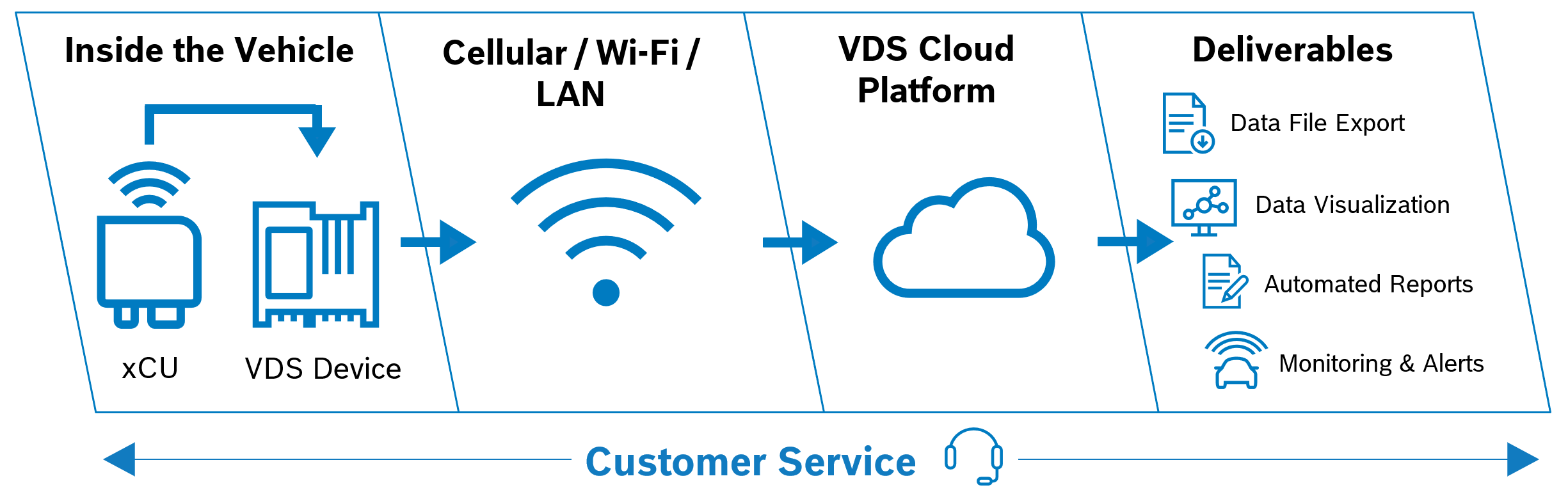
Vehicle Data Solutions is a software-as-a-service platform for collecting development data using an in-vehicle logger. Teams configure what to measure from their own bus and ECU descriptions, deliver it over the air, and work with the recorded trips in dashboards, files and an API.
Vehicle Data Solutions is a connected development data ecosystem for the next generation of vehicles, configured remotely by the customer. It integrates high-speed bus data, XCP and ETK measurement labels, J1979 (-2/-3) and UDS diagnostic data, vehicle location and cloud metadata into a single unified pipeline.
With Vehicle Data Solutions, development engineers search and view measurement data directly on the platform and export MDF, BLF, Parquet or diagnostic snapshot files for detailed analysis. Included dashboards enable fleet-wide monitoring and observability with flexible alerting rules, and a tightly integrated data management engine handles searching, processing and automatically forwarding data to custom pipelines.
Vehicle Data Solutions is engineered to minimize costs and maximize performance when working with the massive data volumes generated by connected development fleets. Data is transmitted and stored in optimized binary formats, all views — dashboards, file exports, and more — dynamically fetch only the required signal data, and everything is indexed and accessible via API or CLI.
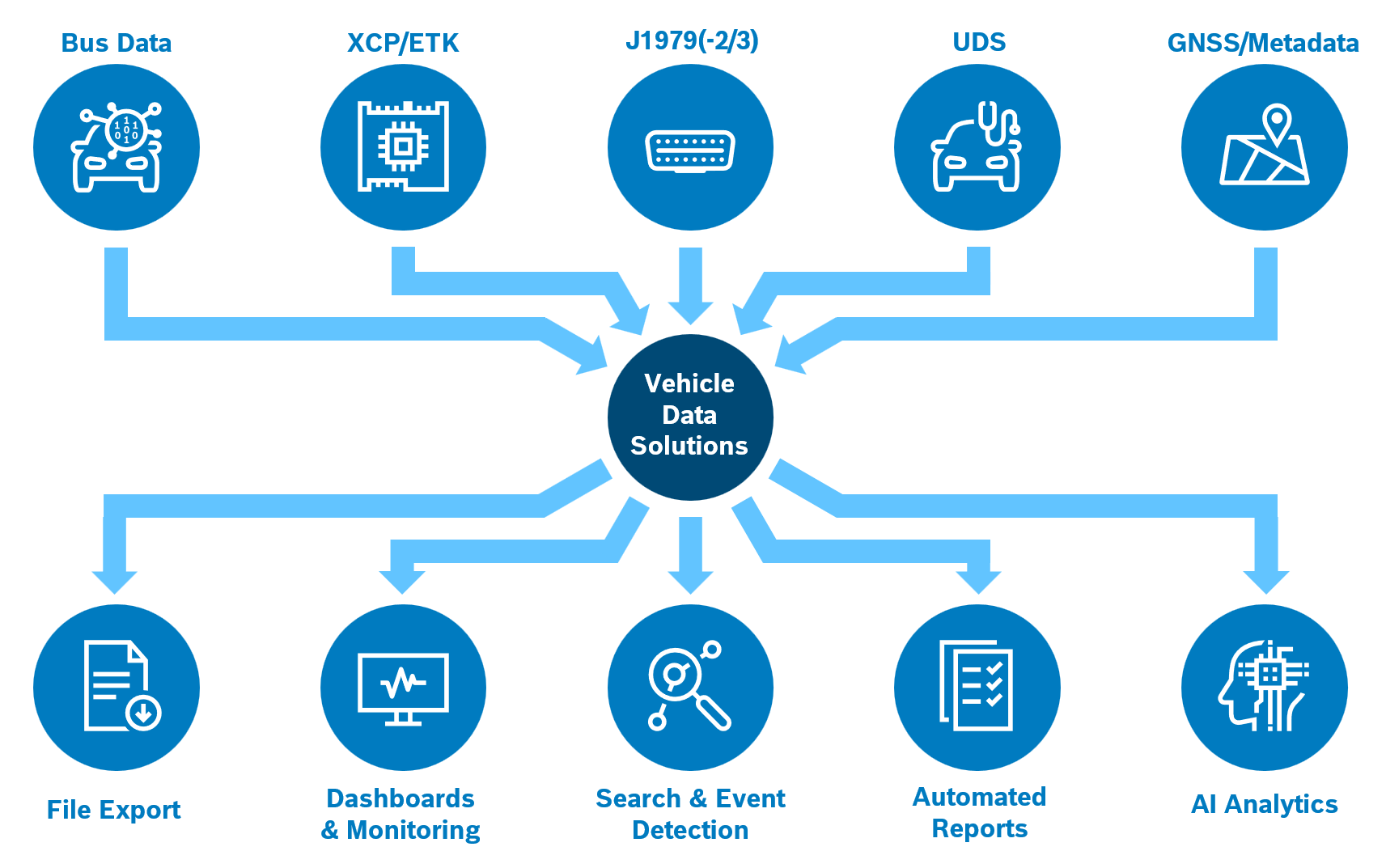
Inputs and outputs of Vehicle Data Solutions.
Why development fleets need a data platform
Distributed fleets
Vehicles and test properties operate remotely, across global engineering teams, platforms and use cases. Many people need the data they produce, and few of them have access to the vehicles.
Explosion of data
Demand is growing for more signals at higher frequencies, configured remotely and recorded under varied use-case conditions.
Increasing complexity
Next-generation software-defined vehicles combine multiple domains, protocols and controllers with complex interactions and requirements.
What Vehicle Data Solutions offers
One platform for configuring, recording and working with vehicle data, operated by Bosch.
Configure measurements from your own descriptions
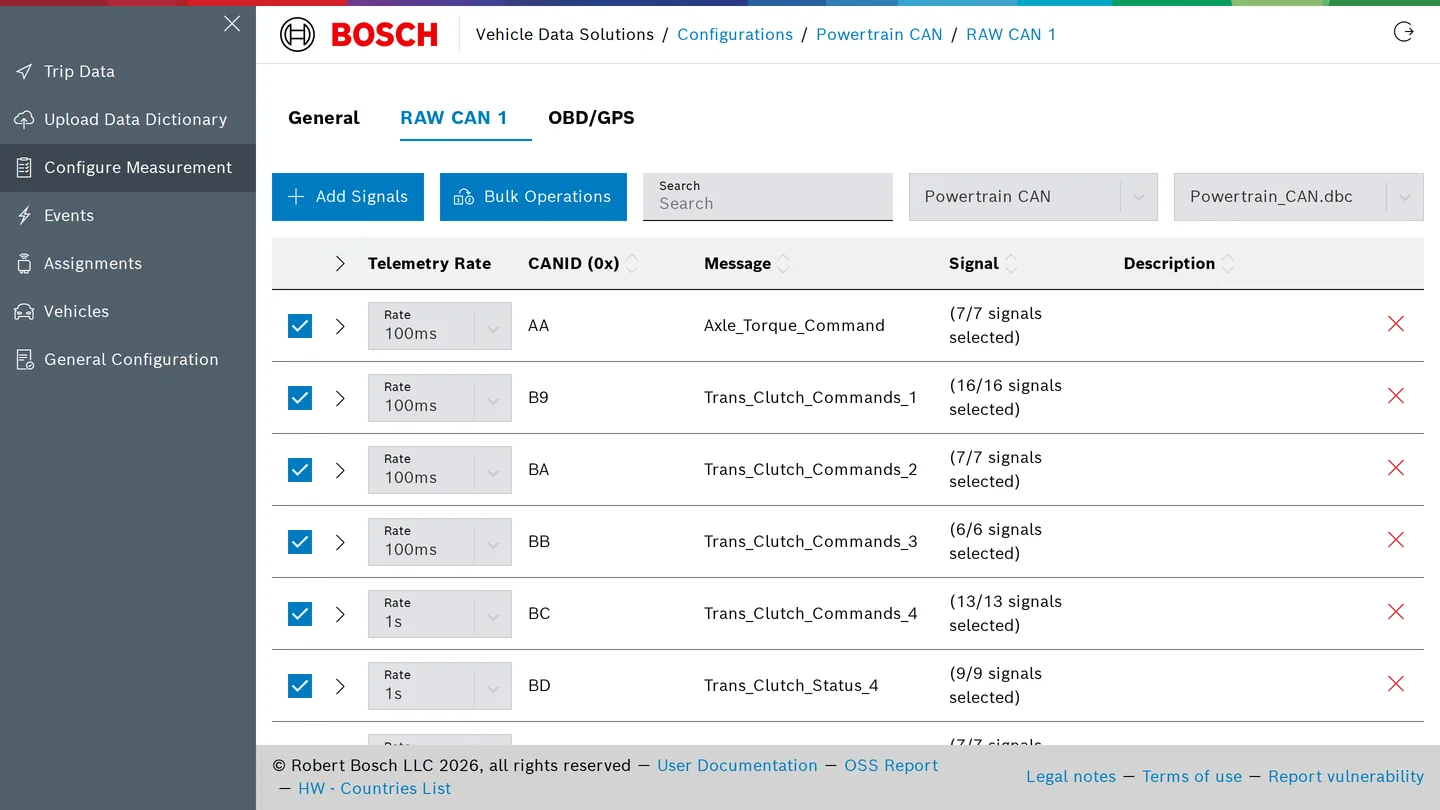
Upload DBC or ARXML files for CAN, A2L files for XCP and CCP over CAN or Ethernet and for ECU-internal measurement through ETAS XETK interfaces, and UDS definitions. Select the signals and rasters to record across CAN, XCP, UDS, OBD and GPS in one measurement configuration, then assign it to a vehicle. The device receives the new configuration over the air.
Every drive becomes a trip
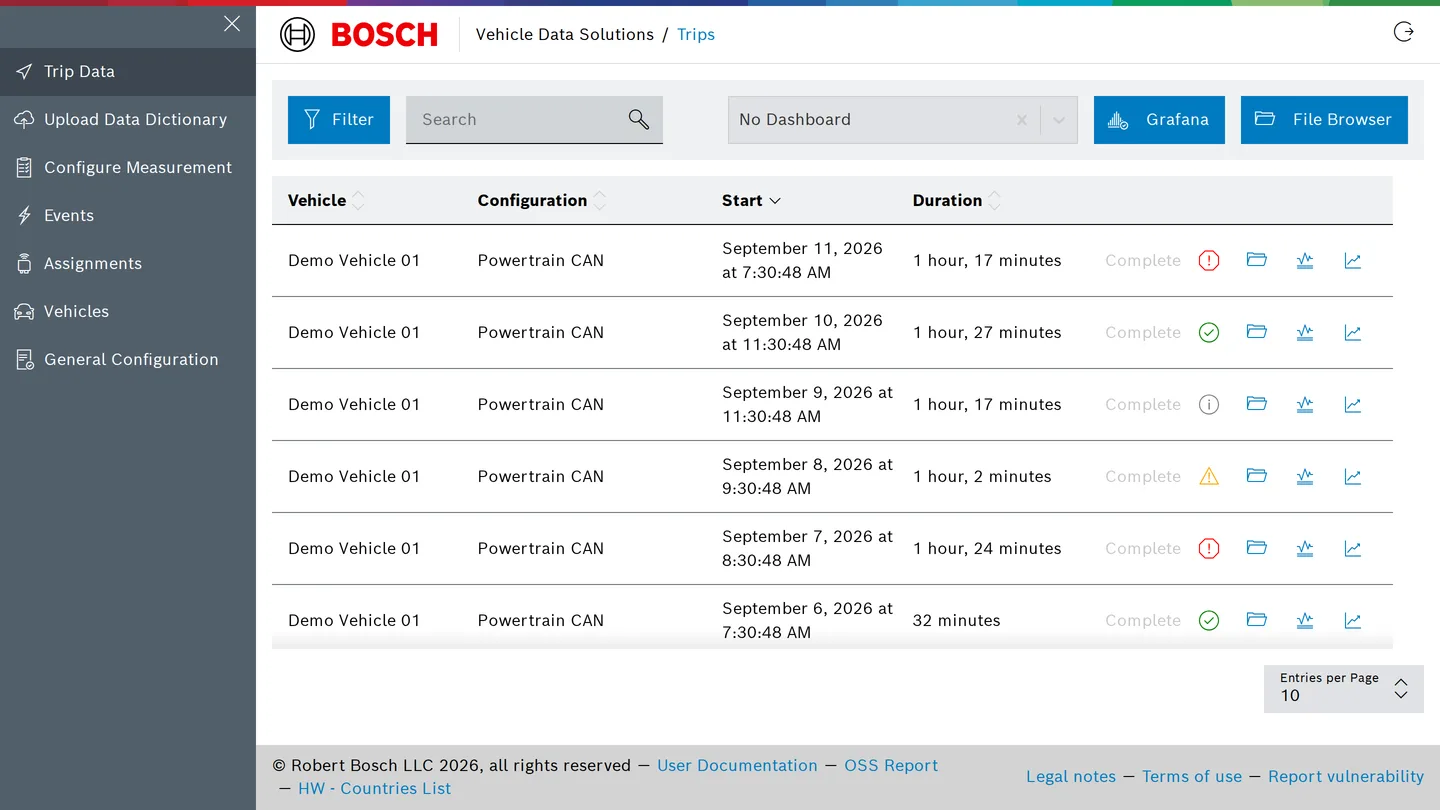
Each ignition-to-ignition drive is recorded as a trip with its vehicle, device and configuration. Active trips show live status and logs from the device, so a setup problem is visible while the vehicle is still on the road rather than after the files arrive.
Dashboards and alerts on the data as it arrives
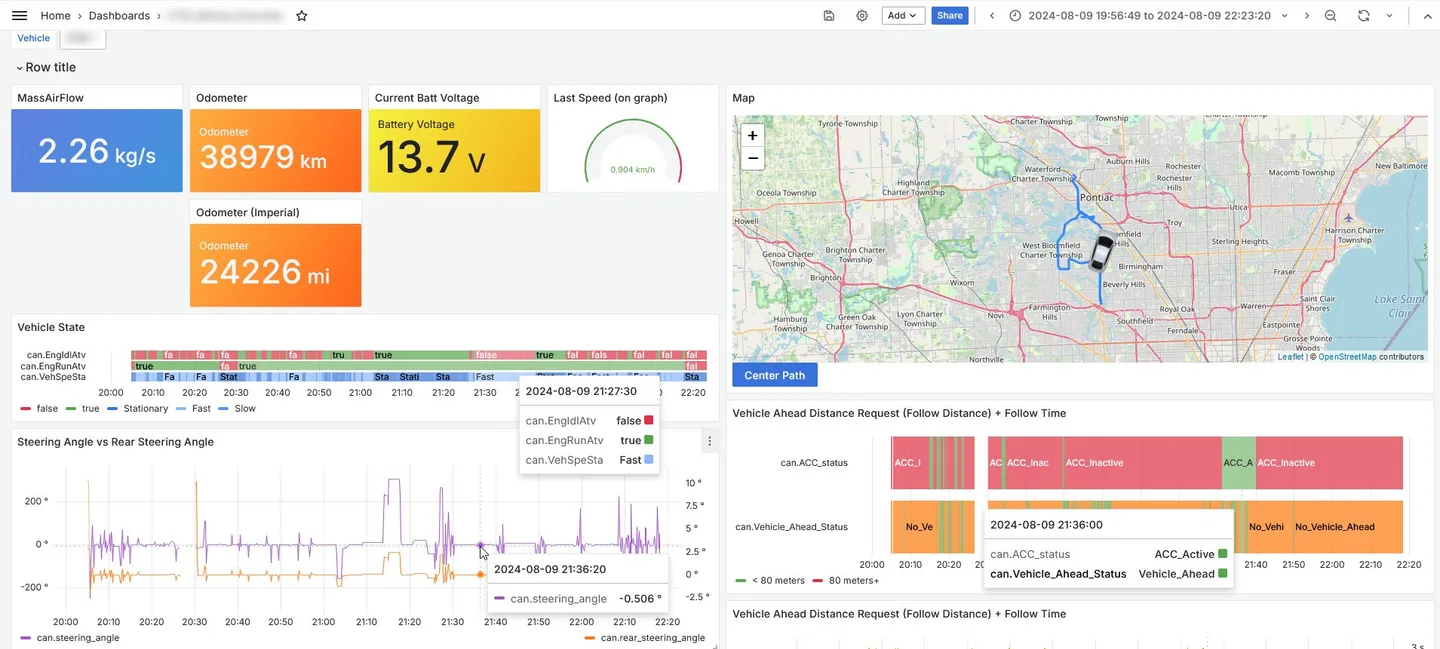
Recorded signals are available in Grafana dashboards per project, together with device health metrics. Alert rules on any signal notify by e-mail or Microsoft Teams, for example when a fault code appears or a value leaves its expected range.
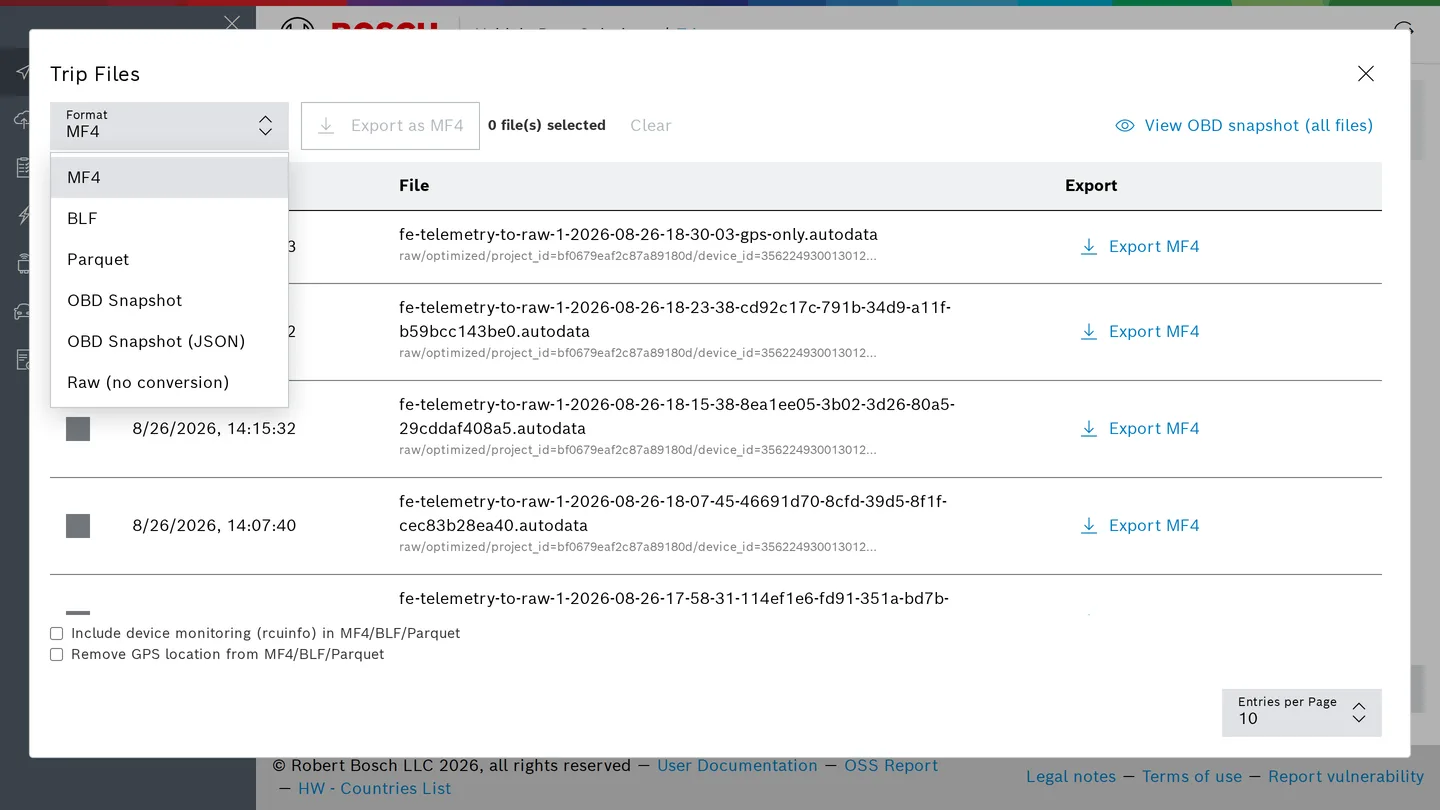
Files in the formats your tools read
Trip files can be downloaded as MF4, BLF or Parquet, or in the raw recording format. Trips with OBD data can be summarised as an OBD snapshot: the latest reading of every PID, fault codes, freeze frames, monitor readiness and test results, viewable in the browser or downloaded as HTML or JSON. Autoplot plots any signal of a trip in the browser and exports selected signals to MF4. Everything the web application does is also available through the REST API and the vds command-line client, so downloads and configuration changes can be scripted.
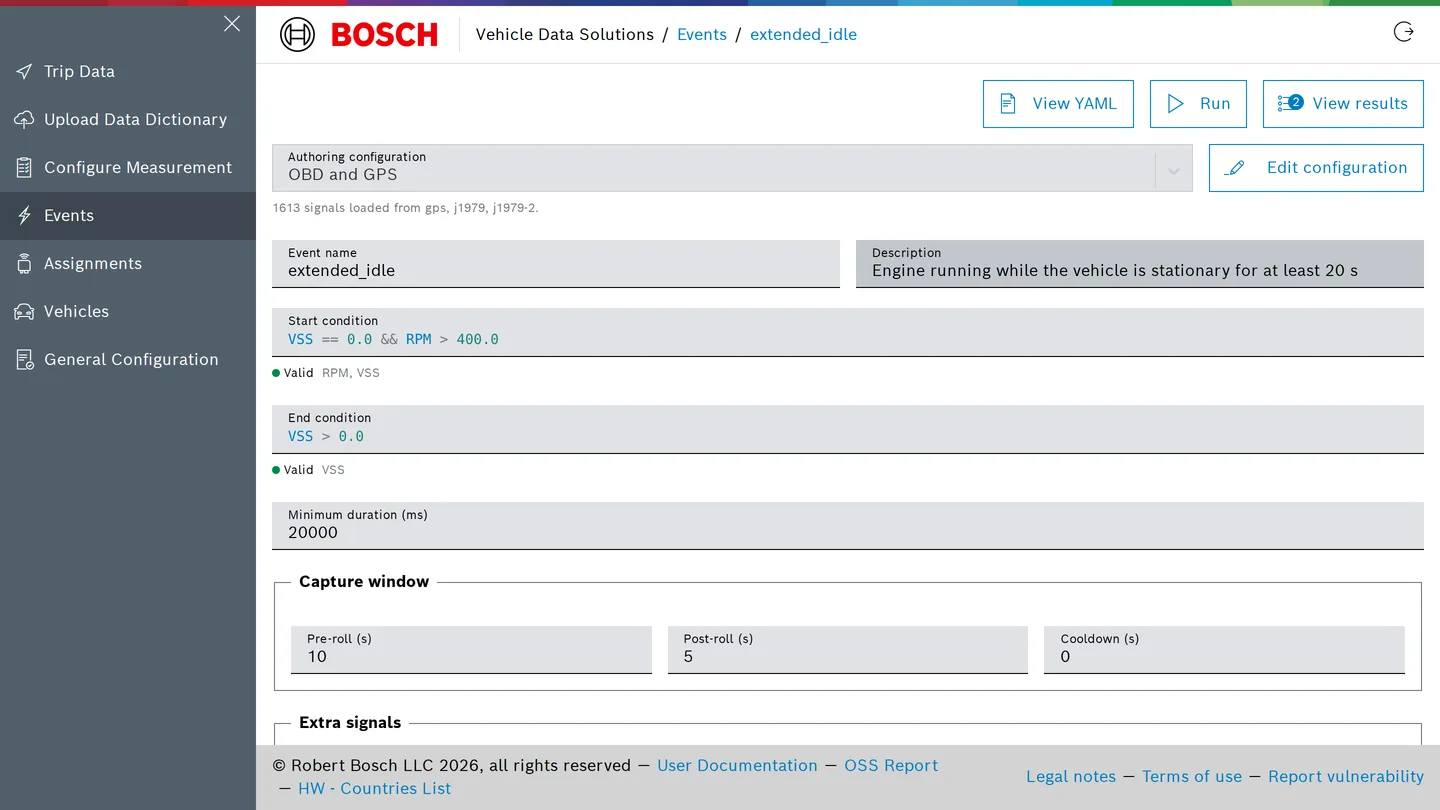
Find situations in recorded drives
Describe a situation as conditions on signals, such as engine running while the vehicle stands still for more than twenty seconds, add calculated signals and a capture window, and run the definition over any set of recorded trips in the cloud. Results list every occurrence with the signals around it.
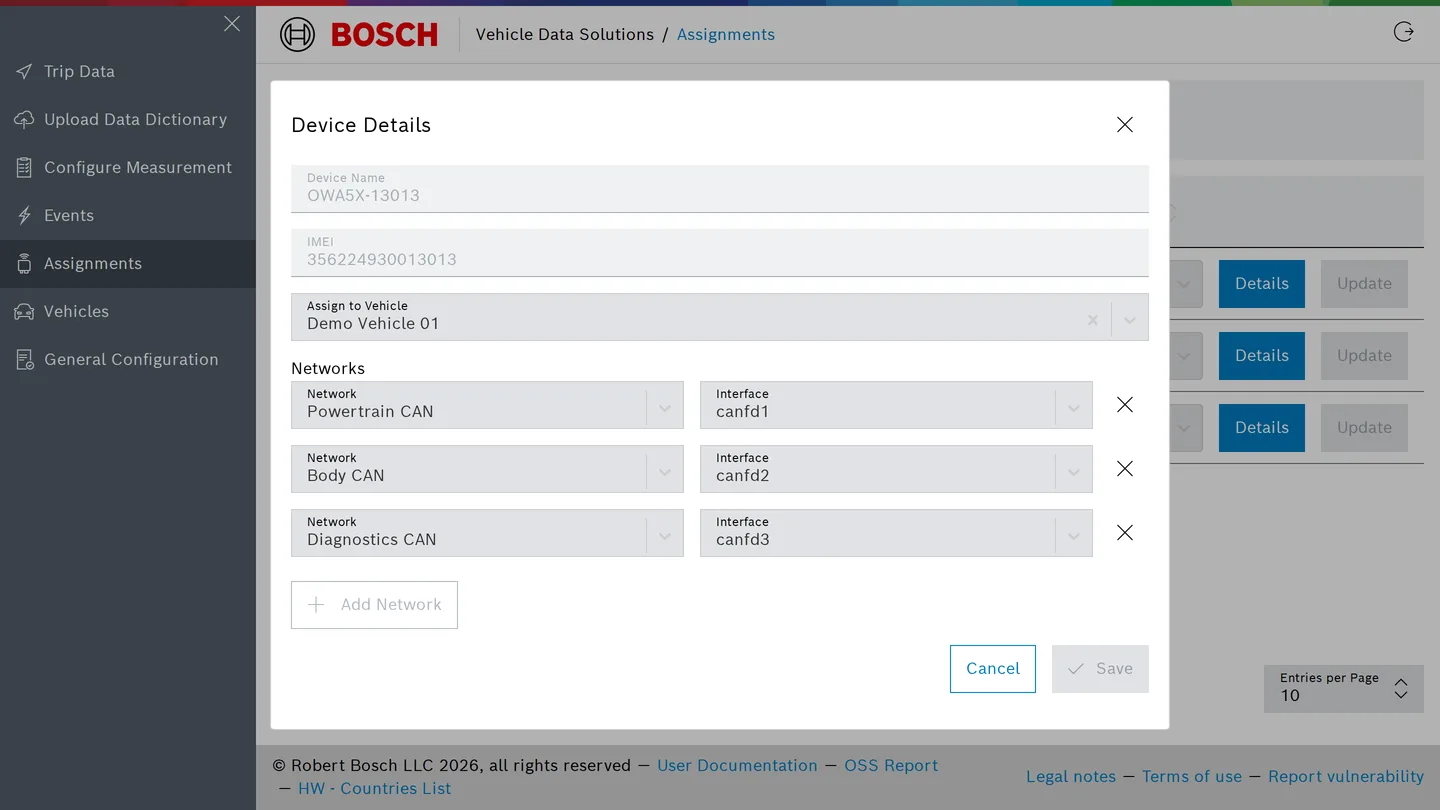
Fleet, devices and people in one place
Create vehicles with the attributes your organisation uses, pair one or more devices with a vehicle, map bus names to physical interfaces, and see which devices are online. Users are managed per project with roles, so a viewer can read results without changing configurations.
From the box to the first trip
- Install the bundle. The hardware bundle contains the data logger, a 4G and GPS antenna and a CAN and power harness. Devices arrive configured for the customer's tenant; connect power (9 to 36 V DC) and the CAN buses.
- Describe and assign. Upload the bus and ECU descriptions, create a measurement configuration, and assign it to the vehicle in the web application. The configuration is delivered over the air.
- Drive. Each drive becomes a trip. Data streams to dashboards during the drive; files and the API are available afterwards.
Works with the buses, ECUs and tools already in use
| Vehicle buses and protocols | CAN(-FD) · XCP on CAN and Ethernet · xETK · UDS · OBD (J1979, J1979-2/3) · GPS |
| Description files | DBC · ARXML · A2L · UDS definitions |
| Output formats | MF4 · BLF · Parquet · OBD snapshot as HTML or JSON |
| Dashboards and alerts | Grafana · e-mail and Microsoft Teams notifications |
| Automation | REST API with published OpenAPI reference · vds command-line client |
The data logger
The acquisition layer is the owa5X in-vehicle computer, supplied by Bosch as a bundle with antenna and harness. It records on four CAN-FD channels and Ethernet, connects over global LTE, Wi-Fi or Bluetooth, and positions with GPS, GLONASS, Galileo and BeiDou. Sleep and wake follow ignition, CAN activity, a timer or movement, so the logger draws little power while the vehicle is parked. Bosch provisions the devices; each one onboards to the customer's tenant using its hardware security module. Status LEDs show cellular connectivity and the connection to the platform.
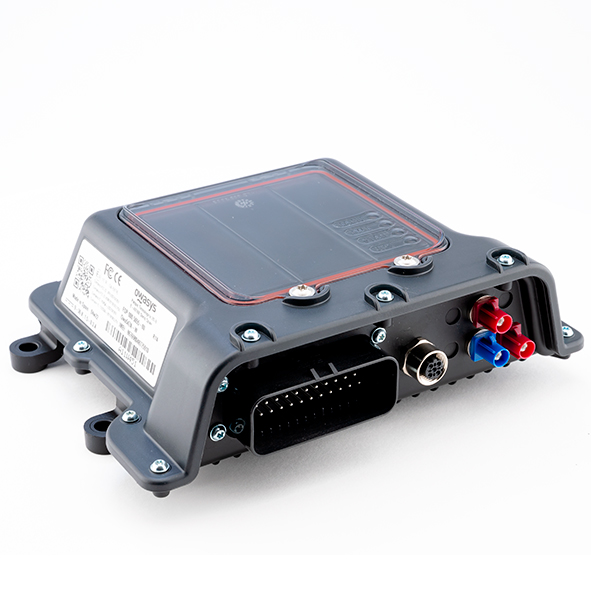
| Specification | Value |
|---|---|
| Specification Interfaces | Value 4× CAN-FD, 100BASE-TX Ethernet (option 100BASE-T1), digital inputs |
| Specification Connectivity | Value Cat. 4 global LTE, Wi-Fi 5, Bluetooth 5.2 |
| Specification Positioning | Value Concurrent GNSS: GPS, GLONASS, Galileo, BeiDou |
| Specification Compute and storage | Value i.MX8 M Plus quad Cortex-A53, 2 GB LPDDR4, 8 GB eMMC, SD expansion up to 256 GB |
| Specification Power supply | Value 9 to 36 V DC; T-15 wake line optional |
| Specification Consumption at 24 V DC | Value Below 1 mA off, about 13 mA standby, about 93 mA recording with cellular and GPS |
| Specification Harness | Value 35-pin connector, three CAN connections, power, T-15 |
Operated by Bosch, isolated per customer
Vehicle Data Solutions is operated by Bosch as a managed service.
Each customer receives a dedicated tenant at <tenant>.bosch-vds.com with its own user directory and role-based access, and data is separated per tenant in storage. A tenant is hosted either in the United States or in Europe, so data from European projects can stay within the EU.
Devices authenticate with hardware-backed certificates and communicate over TLS. GPS position can be excluded from measurement files by configuration or at export. Security issues can be reported to the Bosch Product Security Incident Response Team.
Who works with it
Validation and test engineers
See every vehicle's status and trip data from the office, change measurements without a visit, and read the trip logs when something does not work.
Calibration and software engineers
Record XCP, CAN, UDS and OBD signals against the current software and receive MF4 or BLF files that open in the standard measurement tools.
Data and analytics teams
Receive the same data as Parquet with a consistent structure, ready for notebooks and pipelines, plus an API and command-line client for automation.
Questions and answers
How does a team get access?
Bosch sets up a tenant, ships the hardware bundles and onboards the first users. Write to vds.support@us.bosch.com to start.
Which vehicles and buses are supported?
Any vehicle with accessible CAN or CAN-FD buses, Ethernet-connected ECUs for XCP, or an OBD port (J1979, J1979-2 or J1979-3). The customer provides the descriptions as DBC, ARXML, or A2L files.
Can measurements change without touching the vehicle?
Yes. Configurations are edited in the web application and delivered to the device over the air.
Which tools can read the data?
MF4 and BLF files open in common measurement software. Parquet files are read by data tools and notebooks. The OBD snapshot is available as HTML or JSON. Dashboards run in Grafana. The REST API is documented at docs.bosch-vds.com, and the vds command-line client scripts it.
Who operates the platform and where is the data stored?
Bosch operates the service and stores each tenant's data separately, in the United States or in Europe depending on the tenant. Projects that must keep data within the EU are hosted in Europe.
Talk to Bosch about your fleet
Start a conversation
Describe your vehicles, buses and what you want to measure. The Vehicle Data Solutions team replies with next steps.
Already a customer?
Sign in through the address your team received. The user documentation and support are one click away.